ScanNow Home
- 4.2
- Rating
- 1.00M
- Installs
- Free
- Price
 Analysis by App-foxy
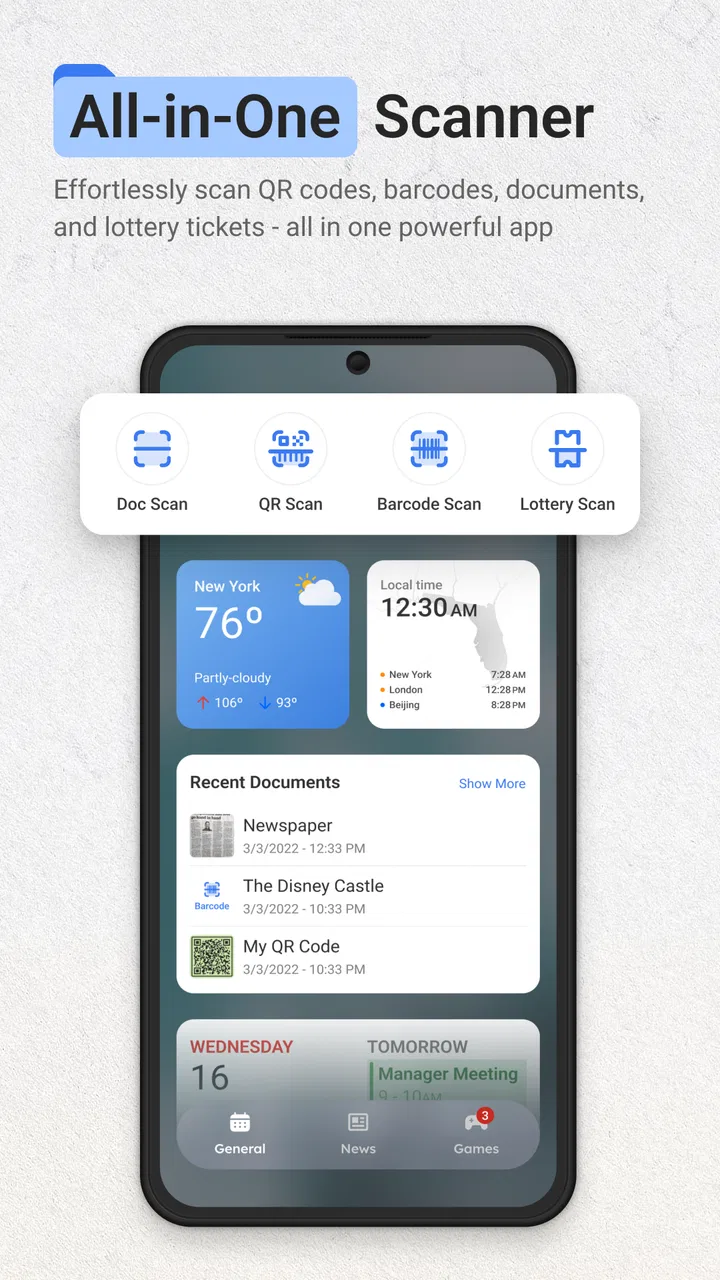
I tried ScanNow Home as a lightweight productivity tool for the small document jobs that usually interrupt the day: turning a paper into a PDF, converting an image, opening a QR code, or keeping a useful shortcut close at hand. Its main idea is simple: instead of making me search through a full app drawer, it puts scanning and conversion tools one swipe away from the home screen.
That focus makes it different from a traditional document scanner. I would not describe it as a complete office suite or a replacement for every file-management tool on a phone. I see it more as a quick-access utility, built for moments when speed matters more than a long list of advanced controls. The app comes from Homescreen Apps, sits in the productivity category, and is free to use.
How ScanNow Home fits into everyday phone use
The app is designed around a familiar problem: I often notice a document, receipt, label, ticket, or code while doing something else, then lose time looking for the right scanner. ScanNow Home tries to remove that pause. Its store summary presents it as a PDF scanner and converter for files, photos, lottery material, and QR codes, with the home-screen shortcut as the central convenience.
You May Also Like

 Blood Strike: 2.5 Anniversary
Blood Strike’s Loadouts Turn Every Drop Into a Tactical Gamble
A close look at Blood Strike’s custom loadouts: how fast access to signature weapons reshapes its battle royale rhythm, rewards preparation, and narrows the gap between fights.

 Pandora - Music & Podcasts
Pandora’s Music Is Easy to Start, but Harder to Recover
Pandora’s strength is its low-effort path from a seed to a station. Its weak spot is how much confidence it asks you to place in connection, setup, and quiet recovery.

 8 Ball Pool
 Is Built on Rivalries, Rematches, and Routine
A close look at the rivalries, rematches, shared routines, and unanswered safety questions that turn a quick pool match into a persistent mobile community.

 Samsung Music
’s Quiet Strength Is Playing What You Already Own
Its reach comes less from spectacle than from dependable access to a personal library. That simplicity is both the app’s strongest retention engine and its ceiling.

 AccuWeather: Weather Radar
AccuWeather Review: A Quick, Clear Forecast for Everyday Decisions
For everyday plans, the best forecast is the one you can understand quickly. AccuWeather makes rain timing, radar, and local conditions easy to act on, with a few trade-offs.

 Hill Climb Racing
Why Hill Climb Racing Still Turns Crashes Into One More Run
A tiny car, a bumpy hill and one more upgrade: Hill Climb Racing keeps resurfacing because its simple chaos makes every near-miss feel personal.
More From Our News Desk



In practice, that positioning matters more than a long feature checklist. A conventional scanner may offer more settings, but it usually expects me to open the app first, choose a mode, and then begin. ScanNow Home is aimed at reducing those steps. If I am standing beside a printer, sitting at a café, or sorting mail at home, the appeal is being able to reach the relevant action immediately.
The app is available at no cost, and that changes how I judge it. I am not weighing a subscription against a professional document workflow. I am asking whether the quick access is useful enough to keep installed, whether the conversion tools save effort, and whether the experience is dependable for ordinary personal tasks. Because the price is free, occasional users can experiment without committing money. That is its clearest value advantage.
It is also suitable for Everyone, which fits the straightforward nature of the tool. The minimum operating-system requirement is Android nine, so compatibility is reasonably broad for people using older Android phones. The current version is 1.1.96, and the app was released on January 29, 2025. Those details make it a relatively recent option rather than a long-established scanner with years of history behind it.
The home-screen approach is the real differentiator
The most useful way to think about ScanNow Home is not “another scanner,” but “a scanner shortcut that happens to include conversion and code-reading tasks.” That distinction helps set expectations. If I already have a scanner app that I open frequently and know well, switching may not be worthwhile. If I rarely scan and usually postpone the task because it feels inconvenient, the shortcut can be more meaningful.
For example, imagine receiving a paper form that needs to be sent as a PDF. With a standard file app, I might photograph it, find the image later, look for a conversion option, and then attach the result to an email. A home-screen-oriented workflow encourages me to start from the task itself. I can treat the paper as something to scan immediately, rather than as a photo that will need organizing later.
That is a small change, but small changes are often where productivity apps earn their place. I would not expect the app to manage an entire archive for me. I would use it to capture the item while it is in front of me, then move the resulting file into the folder, message, or cloud service where it belongs.
What the free access is worth
Since ScanNow Home is free, the financial decision is uncomplicated: there is no purchase price to recover. That makes it easy to test alongside an existing scanner. I can see whether the shortcut fits my habits without paying for a premium tier first. For students, families, occasional freelancers, and anyone who handles paper only now and then, that low-friction entry point is valuable.
Free access does not automatically make an app a good bargain, though. The real question is whether it reduces enough effort to justify another icon, shortcut, or home-screen gesture. In my view, it does when the user regularly deals with mixed tasks rather than scanning alone. A person who needs a PDF one moment and a QR code the next may appreciate having both kinds of actions gathered around the same starting point.
The value is weaker for someone who only wants high-volume document archiving. In that situation, a dedicated scanner may be better because the workflow is built around repeated capture, naming, sorting, and retrieval. ScanNow Home’s appeal is convenience at the point of action, not necessarily deep document administration.
I also like that the app can be approached as a low-risk utility. There is no need to redesign my whole workflow immediately. I can keep my current scanner, use ScanNow Home for quick jobs, and decide after a few days whether its home-screen access actually saves time. That trial-friendly quality is more convincing than claims about replacing every productivity tool.
Useful workflows beyond a basic scan
One practical workflow is handling a paper document while away from a desk. I can scan it when I receive it, create a PDF instead of leaving a loose photo in the gallery, and send it while the context is still fresh. This is especially useful for forms, notices, delivery paperwork, and short documents that do not deserve a permanent filing session.
A second workflow involves photos that already exist on the phone. The converter angle means I do not have to think of every task as “point the camera at a page.” If I photographed a document earlier, I can approach the problem as a file or image conversion job instead. That separation is easy to overlook, but it can prevent duplicated work.
A third use is keeping QR-code actions close to the same scanning habit. QR codes appear on packaging, printed instructions, event materials, and receipts. A separate QR reader may be perfectly adequate, but combining it with document capture can make sense for people who want one familiar entry point instead of several specialized apps.
The reference to lottery material is another specific part of the app’s positioning. I would treat that as a convenience for people who encounter printed lottery items and want a scan-oriented action available quickly. I would not confuse that convenience with a guarantee of checking results, validating tickets, or handling transactions; the useful takeaway is simply that the app includes this kind of scan in its intended range.
Here is a workflow tip I found important: decide where the output should go before scanning. A quick capture is only helpful if the resulting PDF or converted file can be found afterward. I would scan, rename or move the result immediately when the document matters, rather than relying on memory and leaving it mixed with unrelated images. The app can shorten capture time, but it cannot replace a simple filing habit.
Where it may feel less complete
The same simplicity that makes ScanNow Home approachable can make it feel limited beside a full document-management app. People who need extensive annotation, signatures, batch processing, searchable text, detailed folder structures, or business-level sharing should compare it carefully with dedicated alternatives. I would choose a specialized office or scanning suite when those functions are central to my work.
There is also a trade-off between speed and control. A shortcut-first app encourages me to begin quickly, but fast capture can lead to poorly framed pages, unclear filenames, or files that are technically created but not organized. For a one-page form, that is manageable. For a long contract or a month of receipts, I would want a more deliberate process with stronger review and filing tools.
Another point is that “converter” can mean different things to different users. Someone may expect every imaginable format, editable text extraction, or perfect preservation of complex layouts. I would approach ScanNow Home more modestly: it is intended to help with common scan, photo, file, and PDF-related tasks, not to promise a complete professional conversion pipeline. If a document has tables, unusual typography, handwritten notes, or multiple pages, I would inspect the result before sending it.
QR scanning also benefits from ordinary caution. A reader can make opening a code convenient, but convenience should not replace checking where a code leads. I would still look at the destination and avoid entering sensitive information on an unfamiliar page. That is not a defect unique to this app; it is simply part of using any QR tool responsibly.
How it compares with the usual alternatives
Compared with the camera app, ScanNow Home offers a more task-focused starting point. The camera is excellent for taking a picture, but a photograph is not automatically a clean document workflow. If I need a PDF or a conversion step, a specialized utility can reduce the number of decisions after capture.
Compared with a dedicated document scanner, ScanNow Home appears more convenient for occasional mixed jobs. A dedicated scanner may be the better choice for a person who scans every day, maintains a large archive, or needs advanced document controls. ScanNow Home makes more sense for the person who wants a quick tool nearby without building a full filing system around it.
Compared with a separate QR reader, the advantage is consolidation rather than necessarily deeper QR functionality. I would prefer one dedicated reader if QR codes are my main reason for installing an app. I would prefer ScanNow Home when QR reading is just one of several small actions I want available from the home screen.
Compared with paid productivity suites, the free price is attractive, but the comparison should be fair. Paid tools may justify their cost through broader editing, cloud workflows, collaboration, or professional controls. ScanNow Home’s value is not that it wins every feature comparison. Its value is that it can cover common capture and conversion moments without asking me to pay for a larger system I may not need.
Who will get the most from it
I think ScanNow Home is a good fit for people who handle paper irregularly but want a dependable habit for dealing with it immediately. Students can use it for handouts or forms. Parents may find the quick access useful for school notices and printed instructions. Freelancers can capture a receipt or signed page before it disappears into a bag. Home users can keep a QR reader and document scanner within the same general workflow.
It is also suited to people who dislike cluttered productivity apps. The home-screen concept is direct: reach the action, complete the small job, and move on. If I do not want a large office suite for occasional scans, a focused free utility is easier to justify.
I would skip it if my priority is a serious archive, complex editing, or a highly controlled business process. I would also skip it if I already have a scanner that is faster, more accurate for my documents, and easy enough to access. Installing another app only helps when it removes a real point of friction.
The app’s early adoption is encouraging without being a reason to install it blindly. It has an average rating of 4.3 from around 2.9 thousand ratings, with over 500 thousand installs and around 250 written reviews. I read those figures as signs that the concept is resonating with a meaningful group of users, while still remembering that popularity cannot tell me whether its shortcut-based workflow matches my own habits.
My verdict after weighing convenience against control
I recommend ScanNow Home for Android users who want free, quick access to scanning, PDF-related conversion, photo and file handling, and QR-code tasks from the home screen. Its strongest quality is not an ambitious promise to manage every document. It is the way it turns occasional chores into actions I am more likely to complete immediately.
The app earns its place when I value speed and simplicity more than a deep archive. My advice is to test it with three real tasks: scan a paper into a PDF, work with an existing photo or file, and read a QR code. Then check whether the outputs fit naturally into the next step of your routine. If they do, the free access makes the decision easy.
If those tests expose a need for batch scanning, advanced editing, searchable archives, or detailed document controls, I would move to a dedicated alternative instead. That is the honest boundary here. ScanNow Home is most valuable as a fast doorway into small document and scanning tasks, not as a complete replacement for a professional document system.
For my own use, that is enough to recommend it to the right person. I would keep it close for quick captures and QR moments, while using a more specialized tool whenever the document deserves careful editing, organization, or long-term storage. As a free productivity app from Homescreen Apps, it offers a practical convenience with a clear purpose, provided I judge it by the speed of everyday access rather than by features it was never meant to replace.
FAQs for ScanNow Home
01What is ScanNow Home and what does it do?
ScanNow Home is a versatile app designed to transform your smartphone into a powerful document scanner. It allows users to capture high-quality scans of documents, receipts, and notes quickly and efficiently. With features like OCR (Optical Character Recognition), it can convert scanned images into editable text, making it a handy tool for both personal and professional use.
02Is ScanNow Home available on both Android and iOS platforms?
Yes, ScanNow Home is available for download on both Android and iOS devices. This ensures that a wide range of users can benefit from its features, regardless of their preferred mobile platform. You can find the app on the Google Play Store for Android devices and the Apple App Store for iOS devices.
03What are the primary features of ScanNow Home?
ScanNow Home offers a variety of features including high-quality scanning, OCR for text recognition, and the ability to save and share documents in multiple formats such as PDF and JPEG. It also provides organizational tools like folders and tags, which help keep your documents neatly arranged and easily accessible.
04Does ScanNow Home require an internet connection to function?
ScanNow Home does not require an internet connection for basic scanning functionalities. You can scan and save documents offline. However, certain features like cloud storage integration or sharing documents via email may require an internet connection to function properly.
05Are there any subscription fees or in-app purchases in ScanNow Home?
ScanNow Home offers a free version with basic functionalities. However, for access to premium features such as advanced OCR, additional cloud storage options, and ad-free experience, users may opt for a subscription plan or make in-app purchases. This allows users to choose the level of service that best fits their needs.
Pros
- User-friendly interface for easy navigation.
- Quick and accurate document scanning.
- Supports multiple file formats.
- Cloud integration for seamless storage.
- High-quality image processing.
Cons
- Limited free version features.
- Occasional ads can be intrusive.
- Requires permission for camera access.
- No OCR in basic version.
- Lacks advanced editing tools.

ScanNow Home
Gallery